CommandCTRL 1.5 What’s New and Why It Matters for IT Teams
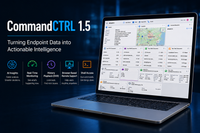
The way IT teams manage digital workspaces is changing. In the past, administrators often started investigating an issue after a user reported it. Now, the focus is more on finding problems earlier and understanding what is actually happening on an endpoint.
That is where I think endpoint management is becoming more interesting. Having a lot of data is useful, but only if you can actually do something with it. On July 8, 2026, Liquidware announced CommandCTRL 1.5. The new version brings together AI Insights, real-time endpoint information, historical data and browser-based remote support.
From fixing problems to finding the cause
Troubleshooting an incident can take quite a bit of time. An administrator may have to look at different sources, check log files and work out what caused the problem.
CommandCTRL 1.5 tries to make this easier with AI Insights. It analyzes endpoint telemetry and can help identify possible root causes.
AI Insights is available in both the Real-Time Dashboard and History Playback (DVR). On a live machine, it can analyze the latest three-second telemetry snapshot. In DVR mode, an administrator can pause the timeline and analyze a ten-second sample, including any trigger rule violations during that period.
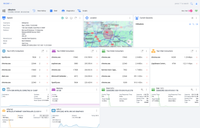
CommandCTRL Overview
There is also an interactive chat console where administrators can ask follow-up questions, create summaries and generate custom reports. The context is kept during the session, which makes it easier to continue the investigation without starting over each time.
For me, the important point is that AI is not replacing the administrator. It is mainly there to speed up the investigation and help make sense of the available data.
AI, but with control over your data
Using AI in an IT environment also raises questions about privacy and security. Companies want to benefit from AI, but they also need to know what happens to their data. With CommandCTRL 1.5, organizations can use their own credentials and choose which AI service they want to work with. Supported options include ChatGPT (OpenAI), Azure OpenAI, Grok (xAI) and Claude (Anthropic).
What I also find useful is that administrators can ask questions directly within CommandCTRL and use the answers to help with remediation. This allows you to go from identifying an issue to taking action without having to switch between different tools. CommandCTRL also takes the handling of sensitive information into account. Usernames, hostnames, IP addresses, domain names, network SSIDs and file paths are tokenized before the data is sent to the AI provider.
This gives organizations more control over how AI is used within their environment, while still being able to use it as part of the troubleshooting process.
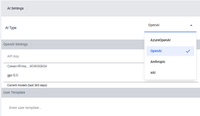
AI settings
AI Support question
Another useful part of the AI functionality is that it does not just wait for you to ask a question. It can immediately provide an overview of the current state of the machine and highlight areas that may need attention.
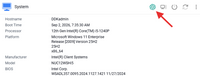
AI info-1
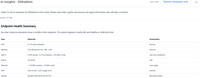
For example, it can look at different parts of the endpoint, such as CPU, memory and network performance, and provide recommendations for each area. This gives the administrator a quick starting point when investigating a machine and can help identify potential improvements before they become a bigger issue. Instead of having to go through all the available endpoint data yourself, AI Insights gives you a summary of what is happening and where it might be worth taking action.
Below are some results from an AI-powered analysis of the endpoint’s health and performance.
AI info-2

AI info-3
Remote support from the browser
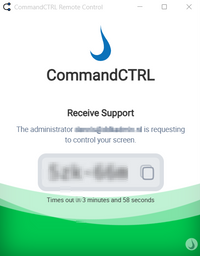
One of the biggest improvements in CommandCTRL 1.5, in my opinion, is the new browser-based Remote Control. It makes it much easier for administrators to provide remote support when a user is having an issue.
Remote support
Previously, starting a remote session could require additional software. With CommandCTRL 1.5, the remote desktop can be opened directly in a dedicated browser tab. This makes remote support quicker and easier to use. An administrator can simply open a remote session from the browser and start helping the user without having to set up additional software first.
Remote Control supports:
• Windows
• macOS
• Linux, including Ubuntu, Red Hat, Fedora and Debian
• IGEL OS
• eLux thin clients
For me, this is a big improvement, especially for IT teams supporting users across different locations and a mix of endpoint platforms.
Real-time information and historical data
Another part of CommandCTRL that I like is the combination of real-time monitoring and historical data. CommandCTRL continuously collects information about endpoint performance and status. This means administrators can see what is happening when an issue occurs.
But real-time information is not always enough. For example, if a user says an application was slow yesterday, looking at the endpoint today will not necessarily tell you what happened at that moment.
This is where History Playback comes in. Administrators can go back to a previous point in time and review what was happening on the machine. Combined with AI Insights, this can make it easier to find the cause of an issue.
Direct access to Stratusphere UX history
For organizations that already use Stratusphere UX, CommandCTRL 1.5 also adds a direct integration. When Stratusphere UX is configured, a Stratusphere History button appears in the machine toolbar. This gives technicians access to the historical Stratusphere UX data for that machine without having to leave CommandCTRL. There is also an option to disable CommandCTRL's own history collection at a site. This makes sense for organizations that already use Stratusphere for long-term history, as it prevents the same data from being collected twice.
Expanded Shell Access
Windows PowerShell was already supported, and native terminal access is now available for macOS and Linux, as well as IGEL and eLux. Each session opens in its own browser tab. Administrators can choose between User and System privileges, depending on what they need to do.
Script Execution Context
Scripts can also be run with either User or System privileges. This gives administrators more control over the security context when using scripts for remediation.
Performance Monitoring Configuration
The history sampling interval can now be set to 10, 20, 30 or 60 seconds. It is also possible to disable history collection completely at a site. This can reduce agent overhead and unnecessary WAN traffic, especially when another product such as Stratusphere is already collecting long-term history.
Support for more types of endpoints
Endpoint environments are no longer just Windows PCs. Many organizations now have a combination of Windows, macOS, Linux and thin-client devices. CommandCTRL 1.5 expands its support to include:
- Windows ARM64 devices, including systems using Snapdragon X Elite processors
- Linux on x86 and ARM64, including Ubuntu, Red Hat Enterprise Linux, Fedora and Debian
- IGEL OS 12
- eLux thin clients
The macOS agent has also been updated to support more macOS versions and now collects network and Wi-Fi statistics. For organizations with a mixed endpoint environment, having this information available from one platform can make administration a lot easier.
Hardware inventory and troubleshooting
Hardware Inventory can be used on demand to get detailed information about Windows devices. This includes processor information, memory, graphics cards, connected monitors, network adapters, available ports and battery health. The system overview also includes security information such as UEFI Boot, Secure Boot and Hypervisor-Protected Code Integrity (HVCI).

This kind of information can be useful when planning hardware replacements or investigating problems with a device. Another new feature is Universal File Collection. Administrators can collect files, log files and other diagnostic information from software on a reachable endpoint. This can be done without starting a remote session or requiring the end user to do anything. The feature works regardless of whether the device is on the corporate network, in a remote office or connected through a home or public network.
CommandCTRL 1.5 also adds Liquidware Product Diagnostics. If a ProfileUnity client or Stratusphere UX agent is installed on the machine, the relevant diagnostic tool becomes available directly from the CommandCTRL Diagnostics panel.
What I find interesting about CommandCTRL 1.5 is not really one single feature. It is the combination of several things.
You have AI Insights to help with analysis, real-time monitoring to see what is happening now, and historical data to look back at previous incidents. On top of that, there is browser-based remote support, shell access and broader support for different types of endpoints.
For an IT team, that can mean less time switching between different tools and potentially a faster way of finding and fixing problems.
The AI part is probably the feature that gets the most attention, but I think the other improvements are just as relevant for everyday use. Especially the browser-based remote control and the integration with historical data.
What I find most interesting is that the focus is not simply on collecting more endpoint data. The goal is to make that data easier to understand and actually use when solving problems.
CommandCTRL 1.5 is generally available and includes a free Community Edition. That makes it possible to try the platform. For organizations that are already using Liquidware products, or are looking for a way to manage different types of endpoints from one place, CommandCTRL 1.5 is definitely worth taking a look at.
If you would like to learn more about CommandCTRL 1.5 or discuss how it could complement your existing endpoint management strategy, feel free to reach out to me or contact Liquidware directly.
Thank you for reading. I hope this article has given you a useful overview of CommandCTRL 1.5 and the capabilities it brings to endpoint management. I would love to hear your thoughts, experiences, or questions about the platform.